游戏玩家列表设计
游戏玩家列表概述
玩家登录游戏后,开始等待其他玩家的进入,如图 18.12 所示。在登录游戏的表单下面,显示玩家列表,在另一位玩家未进入之前,显示 “等待其他用户加入”,如果另一位玩家进入后,则可以开始游戏。
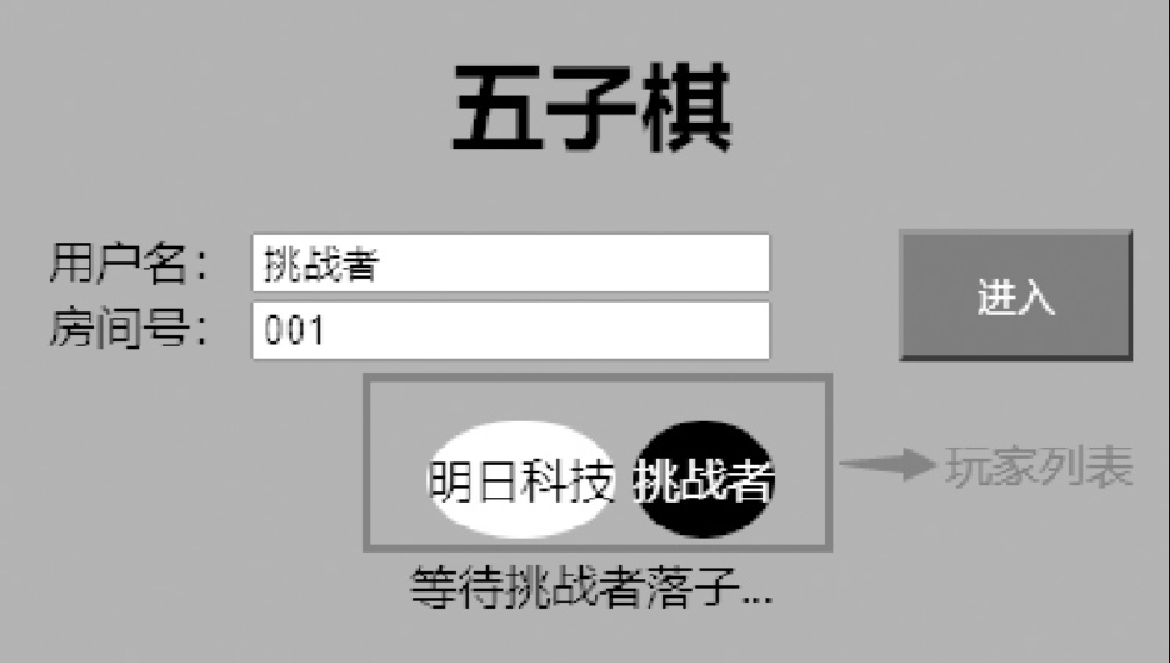
Figure 1. 图18.12 游戏玩家列表的界面
游戏玩家列表的实现
从图 18.12 所示的界面可以发现,游戏玩家列表只有对战双方,而且背景颜色分别是白色和黑色,代表五子棋棋子的颜色。
在 public 文件夹下创建 index.html 文件,其中使用不同的 CSS 样式,将玩家列表以及玩家的状态显示出来,并使用 Canvas 技术绘制棋盘。index.html 文件中的代码如下:
<!DOCTYPE html>
<html lang="en">
<head>
	<meta charset="UTF-8">
	<title>五子棋online</title>
	<meta name="viewport" content="width=device-width, user-scalable=no, initial-scale=1.0, maximum-scale=1.0, minimum-scale=1.0">
  <link rel="stylesheet" media="screen and (min-width:900px)" href="style.css">
	<link rel="stylesheet" media="screen and (max-width:500px)" href="mobile_style.css">
  <link rel="shortcut icon" href="favicon.ico" />
  <link rel="bookmark" href="favicon.ico" type="image/x-icon" />
</head>
<body onbeforeunload="checkLeave()" style="background-color: #1abc9c">

<h1>五子棋</h1>

<div id="current">
	<!-- <div id="currentPlayer"></div> -->
	<!-- <div id="winner"></div> -->
  <div class="infoWrapper">
    <div class="info">
      <label for="user">用户名:</label>
      <input type="text" name="user" id="user">
    </div>
    <div class="info">
      <label for="room">房间号:</label>
      <input type="number" name="text" id="room">
    </div>
  </div>
  <button id="enter">进入</button>
</div>
<div class="userWrapper">
  <div class="userInfo"></div>
  <div class="waitingUser"></div>
</div>
<div class="chessBoard">
 <canvas id="chess" width="450px" height="450px"></canvas>
  <canvas id="layer" width="450px" height="450px"></canvas>
</div>

<form id="action">
  <!-- <button id="restart" value='重新开始' onclick='reStart()'>
  重新开始
  </button> -->
  <!-- <button type="button" class="first" value='黑棋优先' onclick='blackFirst()'>黑棋优先</button>
  <button type="button" class="first" value='白棋优先' onclick='whiteFirst()'>白棋优先</button> -->
  <!-- <button type="button" id="cancelOne" onclick='cancel()'>撤销一步</button> -->
  <input type="color" id="colorSelect" name="color" value="#DEB887">
</form>

<script src="https://cdn.bootcss.com/socket.io/2.2.0/socket.io.js"></script>
<script src="chessBoard.js"></script>
</body>
</html>