文件与目录差异对比方法
当我们进行代码审计或校验备份结果时,往往需要检查原始与目标目录的文件一致性,Python 的标准库已经自带了满足此需求的模块 filecmp。filecmp 可以实现文件、目录、遍历子目录的差异对比功能。比如报告中输出目标目录比原始多出的文件或子目录,即使文件同名也会判断是否为同一个文件(内容级对比)等,Python 2.3 或更高版本默认自带 filecmp 模块,无需额外安装,下面进行详细介绍。
模块常用方法说明
filecmp 提供了三个操作方法,分别为 cmp(单文件对比)、cmpfiles(多文件对比)、dircmp(目录对比),下面逐一进行介绍:
-
单文件对比,采用 filecmp.cmp(f1, f2[, shallow]) 方法,比较文件名为 f1 和 f2 的文件,相同返回 True,不相同返回 False,shallow 默认为 True,意思是只根据 os.stat() 方法返回的文件基本信息进行对比,比如最后访问时间、修改时间、状态改变时间等,会忽略文件内容的对比。当 shallow 为 False 时,则 os.stat() 与文件内容同时进行校验。
示例:比较单文件的差异>>> filecmp.cmp("/home/test/filecmp/f1","/home/test/filecmp/f3") True >>> filecmp.cmp("/home/test/filecmp/f1","/home/test/filecmp/f2") False -
多文件对比,采用 filecmp.cmpfiles(dir1, dir2, common[, shallow]) 方法,对比 dir1 与 dir2 目录给定的文件清单。该方法返回文件名的三个列表,分别为匹配、不匹配、错误。匹配为包含匹配的文件的列表,不匹配反之,错误列表包括了目录不存在文件、不具备读权限或其他原因导致的不能比较的文件清单。
示例:dir1 与 dir2 目录中指定文件清单对比。
两目录下文件的 md5 信息如下,其中 f1、f2 文件匹配;f3 不匹配;f4、f5 对应目录中不存在,无法比较。
[root@SN2013-08-020 dir2]# md5sum *
d9dfc198c249bb4ac341198a752b9458  f1
aa9aa0cac0ffc655ce9232e720bf1b9f  f2
33d2119b71f717ef4b981e9364530a39  f3
d9dfc198c249bb4ac341198a752b9458  f5
[root@SN2013-08-020 dir1]# md5sum *
d9dfc198c249bb4ac341198a752b9458  f1
aa9aa0cac0ffc655ce9232e720bf1b9f  f2
d9dfc198c249bb4ac341198a752b9458  f3
410d6a485bcf5d2d2d223f2ada9b9c52  f4
使用 cmpfiles 对比的结果如下,符合我们的预期。
>>>filecmp.cmpfiles("/home/test/filecmp/dir1","/home/test/filecmp/dir2",['f1','f2', 'f3','f4','f5']) (['f1', 'f2'], ['f3'], ['f4', 'f5']) -
目录对比,通过 dircmp(a, b[, ignore[, hide]]) 类创建一个目录比较对象,其中 a 和 b 是参加比较的目录名。ignore 代表文件名忽略的列表,并默认为 ['RCS', 'CVS', 'tags'];hide 代表隐藏的列表,默认为 [os.curdir,os.pardir]。dircmp 类可以获得目录比较的详细信息,如只有在 a 目录中包括的文件、a 与 b 都存在的子目录、匹配的文件等,同时支持递归。
dircmp 提供了三个输出报告的方法:
-
report(),比较当前指定目录中的内容;
-
report_partial_closure(),比较当前指定目录及第一级子目录中的内容;
-
report_full_closure(),递归比较所有指定目录的内容。
为输出更加详细的比较结果,dircmp 类还提供了以下属性:
-
left,左目录,如类定义中的 a;
-
right,右目录,如类定义中的 b;
-
left_list,左目录中的文件及目录列表;
-
right_list,右目录中的文件及目录列表;
-
common,两边目录共同存在的文件或目录;
-
left_only,只在左目录中的文件或目录;
-
right_only,只在右目录中的文件或目录;
-
common_dirs,两边目录都存在的子目录;
-
common_files,两边目录都存在的子文件;
-
common_funny,两边目录都存在的子目录(不同目录类型或 os.stat() 记录的错误);
-
same_files,匹配相同的文件;
-
diff_files,不匹配的文件;
-
funny_files,两边目录中都存在,但无法比较的文件;
-
subdirs,将 common_dirs 目录名映射到新的 dircmp 对象,格式为字典类型。
示例:对比 dir1 与 dir2 的目录差异。
通过调用 dircmp() 方法实现目录差异对比功能,同时输出目录对比对象所有属性信息。
import filecmp

a="/home/test/filecmp/dir1"    #定义左目录
b="/home/test/filecmp/dir2"    #定义右目录

dirobj=filecmp.dircmp(a,b,['screenshot_firefox.py'])    #目录比较,忽略test.py文件

#输出对比结果数据报表,详细说明请参考filecmp类方法及属性信息
dirobj.report()
dirobj.report_partial_closure()
dirobj.report_full_closure()

print "left_list:"+ str(dirobj.left_list)
print "right_list:"+ str(dirobj.right_list)
print "common:"+ str(dirobj.common)
print "left_only:"+ str(dirobj.left_only)
print "right_only:"+ str(dirobj.right_only)
print "common_dirs:"+ str(dirobj.common_dirs)
print "common_files:"+ str(dirobj.common_files)
print "common_funny:"+ str(dirobj.common_funny)
print "same_file:"+ str(dirobj.same_files)
print "diff_files:"+ str(dirobj.diff_files)
print "funny_files:"+ str(dirobj.funny_files)
为方便理解,通过 tree 命令输出两个目录的树结构,如图2-4所示。
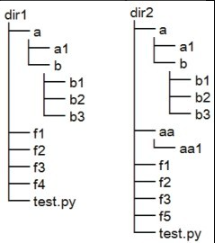
运行前面的代码并输出,结果如下:
# python simple1.py
-------------------report---------------------
diff /home/test/filecmp/dir1 /home/test/filecmp/dir2
Only in /home/test/filecmp/dir1 : ['f4']
Only in /home/test/filecmp/dir2 : ['aa', 'f5']
Identical files : ['f1', 'f2']
Differing files : ['f3']
Common subdirectories : ['a']
-------------report_partial_closure-----------
diff /home/test/filecmp/dir1 /home/test/filecmp/dir2
Only in /home/test/filecmp/dir1 : ['f4']
Only in /home/test/filecmp/dir2 : ['aa', 'f5']
Identical files : ['f1', 'f2']
Differing files : ['f3']
Common subdirectories : ['a']
diff /home/test/filecmp/dir1/a /home/test/filecmp/dir2/a
Identical files : ['a1']
Common subdirectories : ['b']
-------------report_full_closure--------------
diff /home/test/filecmp/dir1 /home/test/filecmp/dir2
Only in /home/test/filecmp/dir1 : ['f4']
Only in /home/test/filecmp/dir2 : ['aa', 'f5']
Identical files : ['f1', 'f2']
Differing files : ['f3']
Common subdirectories : ['a']
diff /home/test/filecmp/dir1/a /home/test/filecmp/dir2/a
Identical files : ['a1']
Common subdirectories : ['b']
diff /home/test/filecmp/dir1/a/b /home/test/filecmp/dir2/a/b
Identical files : ['b1', 'b2', 'b3']
left_list:['a', 'f1', 'f2', 'f3', 'f4']
right_list:['a', 'aa', 'f1', 'f2', 'f3', 'f5']
common:['a', 'f1', 'f2', 'f3']
left_only:['f4']
right_only:['aa', 'f5']
common_dirs:['a']
common_files:['f1', 'f2', 'f3']
common_funny:[]
same_file:['f1', 'f2']
diff_files:['f3']
funny_files:[]
实践:校验源与备份目录差异
有时候我们无法确认备份目录与源目录文件是否保持一致,包括源目录中的新文件或目录、更新文件或目录有无成功同步,定期进行校验,没有成功则希望有针对性地进行补备份。本示例使用了filecmp 模块的 left_only、diff_files 方法递归获取源目录的更新项,再通过 shutil.copyfile、os.makedirs 方法对更新项进行复制,最终保持一致状态。详细源码如下:
#!/usr/bin/env python
import os, sys
import filecmp
import re
import shutil
holderlist=[]
def compareme(dir1, dir2):    #递归获取更新项函数
    dircomp=filecmp.dircmp(dir1,dir2)
    only_in_one=dircomp.left_only    #源目录新文件或目录
    diff_in_one=dircomp.diff_files    #不匹配文件,源目录文件已发生变化
    dirpath=os.path.abspath(dir1)    #定义源目录绝对路径
    #将更新文件名或目录追加到holderlist
    [holderlist.append(os.path.abspath(os.path.join(dir1,x))) for x in only_in_one]
    [holderlist.append(os.path.abspath(os.path.join(dir1,x))) for x in diff_in_one]
    if len(dircomp.common_dirs) > 0:    #判断是否存在相同子目录,以便递归
        for item in dircomp.common_dirs:    #递归子目录
            compareme(os.path.abspath(os.path.join(dir1,item)), \
            os.path.abspath(os.path.join(dir2,item)))
        return holderlist
def main():
    if len(sys.argv) > 2:    #要求输入源目录与备份目录
        dir1=sys.argv[1]
        dir2=sys.argv[2]
    else:
        print "Usage: ", sys.argv[0], "datadir backupdir"
        sys.exit()
    source_files=compareme(dir1,dir2)    #对比源目录与备份目录
    dir1=os.path.abspath(dir1)
    if not dir2.endswith('/'): dir2=dir2+'/'    #备份目录路径加“/”符
    dir2=os.path.abspath(dir2)
    destination_files=[]
    createdir_bool=False
    for item in source_files:    #遍历返回的差异文件或目录清单
    destination_dir=re.sub(dir1, dir2, item)      #将源目录差异路径清单对应替换成
                                                  #备份目录
    destination_files.append(destination_dir)
    if os.path.isdir(item):    #如果差异路径为目录且不存在,则在备份目录中创建
          if not os.path.exists(destination_dir):
              os.makedirs(destination_dir)
              createdir_bool=True    #再次调用compareme函数标记
    if createdir_bool:    #重新调用compareme函数,重新遍历新创建目录的内容
    destination_files=[]
    source_files=[]
    source_files=compareme(dir1,dir2)    #调用compareme函数
    for item in source_files:    #获取源目录差异路径清单,对应替换成备份目录
          destination_dir=re.sub(dir1, dir2, item)
          destination_files.append(destination_dir)
    print "update item:"
    print source_files    #输出更新项列表清单
    copy_pair=zip(source_files,destination_files)    #将源目录与备份目录文件清单拆分成元组
    for item in copy_pair:
    if os.path.isfile(item[0]):       #判断是否为文件,是则进行复制操作
          shutil.copyfile(item[0], item[1])

if __name__ == '__main__':
    main()
更新源目录 dir1 中的 f4、code/f3 文件后,运行程序结果如下:
# python simple2.py /home/test/filecmp/dir1 /home/test/filecmp/dir2
update item:
['/home/test/filecmp/dir1/f4', '/home/test/filecmp/dir1/code/f3']
# python simple2.py /home/test/filecmp/dir1 /home/test/filecmp/dir2
update item:
[]    #再次运行时已经没有更新项了