playbook 角色与包含声明
当我们写一个非常大的 playbook 时,想要复用些功能显得有些吃力,还好Ansible 支持写 playbook 时拆分成多个文件,通过包含(include)的形式进行引用,我们可以根据多种维度进行 “封装”,比如定义变量、任务、处理程序等。
角色建立在包含文件之上,抽象后更加清晰、可复用。运维人员可以更专注于整体,只有在需要时才关注具体细节。Ansible 官方在 GitHub 上提供了大量的示例供大家参考借鉴,访问地址 https://github.com/ansible/ansible-examples 即可获相应的学习资料。
包含文件,鼓励复用
当多个 playbook 涉及复用的任务列表时,可以将复用的内容剥离出,写到独立的文件当中,最后在需要的地方 include 进来即可,示例如下:
---
# possibly saved as tasks/foo.yml
- name: placeholder foo
      command: /bin/foo
- name: placeholder bar
      command: /bin/bar
然后就可以在使用的 playbook 中 include 进来,如:
tasks:
  - include: tasks/foo.yml
当然,也可以将变量传递到包含文件当中,这称为 “参数包含”。
如在部署多个 WordPress 的情况下,可以根据不同用户单独部署 WordPress 的任务,且引用单个 wordpress.yml 文件,可以这样写:
tasks:
      - include: wordpress.yml user=timmy
      - include: wordpress.yml user=alice
      - include: wordpress.yml user=bob
注意,1.4 或更高版本可支持以 Python 的字典、列表的传递参数形式,如:
tasks:
    - { include: wordpress.yml, user: timmy, ssh_keys: [ 'keys/one.txt', 'keys/two.txt' ] }
使用这两种方法都进行变量传递,然后在包含文件中通过使用 {{user }} 进行变量引用。
将处理程序(handlers)放到包含文件中是一个好的做法,比如重启 Apache 的任务,如下:
---
# this might be in a file like handlers/handlers.yml
- name: restart apache
  service: name=apache state=restarted
需要时可以进行引用,像这样:
handlers:
  - include: handlers/handlers.yml
角色
现在我们已经了解了变量、任务、处理程序的定义,有什么方法更好地进行组织或抽象,让其复用性更强、功能更具模块化?答案就是角色。角色是 Ansible 定制好的一种标准规范,以不同级别目录层次及文件对角色、变量、任务、处理程序等进行拆分,为后续功能扩展、可维护性打下基础。一个典型角色目录结构的示例如下:
site.yml
webservers.yml
fooservers.yml
roles/
  common/
    files/
    templates/
    tasks/
    handlers/
    vars/
    meta/
  webservers/
    files/
      templates/
      tasks/
      handlers/
      vars/
      meta/
在 playbook 是这样引用的:
---
- hosts: webservers
      roles:
      - common
      - webservers
角色定制以下规范,其中 x 为角色名。
-
如 roles/x/tasks/main.yml 文件存在,其中列出的任务将被添加到执行队列;
-
如 roles/x/handlers/main.yml 文件存在,其中所列的处理程序将被添加到执行队列;
-
如 roles/x/vars/main.yml 文件存在,其中列出的变量将被添加到执行队列;
-
如 roles/x/meta/main.yml 文件存在,所列任何作用的依赖关系将被添加到角色的列表(1.3及更高版本);
-
任何副本任务可以引用 roles/x/files/ 无需写路径,默认相对或绝对引用;
-
任何脚本任务可以引用 roles/x/files/ 无需写路径,默认相对或绝对引用;
-
任何模板任务可以引用文件中的 roles/x/templates/ 无需写路径,默认相对或绝对引用。
为了便于大家更好地理解和使用角色(role),对 9.6 节中的 nginx 软件包管理的 playbook(独立文件)修改成角色的形式,同时添加了一个公共类角色 common,从角色全局作用域中抽取出公共的部分,一般为系统的基础服务,比如 ntp、iptables、selinux、sysctl 等。本示例是针对 ntp 服务的管理。
playbook目录结构
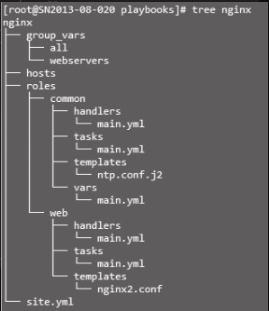
playbook 目录包括变量定义目录 group_vars、主机组定义文件 hosts、全局配置文件 site. yml、角色功能目录,playbook 目录结构可参考图9-5。
定义主机组
以下定义了一个业务组 webservers,成员为两台主机。
[webservers]
192.168.1.21
192.168.1.22
非必选配置,默认将引用 /etc/ansible/hosts 的参数,角色中自定义组与主机文件将通过 “-i file” 命令行参数调用,如 ansible-playbook -i hosts 来调用。
定义主机或组变量
定义规则见 9.3 节所述,group_vars 为定义组变量目录,目录当中的文件名要与组名保持一致,组变量文件定义的变量作为域只受限于该组,all 代表所有主机。
---
# Variables listed here are applicable to all host groups
ntpserver: ntp.sjtu.edu.cn---
worker_processes: 4
num_cpus: 4
max_open_file: 65536
root: /data全局配置文件site.yml
下面的全局配置文件引用了两个角色块,角色的应用范围及实现功能都不一样:
---
- name: apply common configuration to all nodes
      hosts: all
      roles:
        - common
- name: configure and deploy the webservers and application code
      hosts: webservers
      roles:
        - web
全局配置文件 site.yml 引用了两个角色,一个为公共类的 common,另一个为 web 类,分别对应 nginx/common、nginx/web 目录。以此类推,可以引用更多的角色,如 db、nosql、hadoop 等,前提是我们先要进行定义,通常情况下一个角色对应着一个特定功能服务。通过 hosts 参数来绑定角色对应的主机或组。
角色common的定义
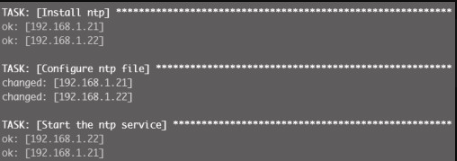
角色 common 定义了 handlers、tasks、templates、vars 4 个功能类,分别存放处理程序、任务列表、模板、变量的配置文件 main.yml,需要注意的是,vars/main.yml 中定义的变量优先级高于 /nginx/group_vars/all,可以从 ansible-playbook 的执行结果中得到验证。各功能块配置文件定义如下:
- name: restart ntp
service: name=ntpd state=restarted- name: Install ntp
yum: name=ntp state=present
- name: Configure ntp file
template: src=ntp.conf.j2 dest=/etc/ntp.conf
notify: restart ntp
- name: Start the ntp service
service: name=ntpd state=started enabled=true
- name: test to see if selinux is running
command: getenforce
register: sestatus
changed_when: false其中 template: src=ntp.conf.j2 引用模板时无需写路径,默认在上级的 templates 目录中查找。
driftfile /var/lib/ntp/drift
restrict 127.0.0.1
restrict -6 ::1
server {{ ntpserver }}
includefile /etc/ntp/crypto/pw
keys /etc/ntp/keys
此处 {{ ntpserver }} 将引用 vars/main.yml 定义的 ntpserver 变量。
---
# Variables listed here are applicable to all host groups
ntpserver: 210.72.145.44
角色web的定义
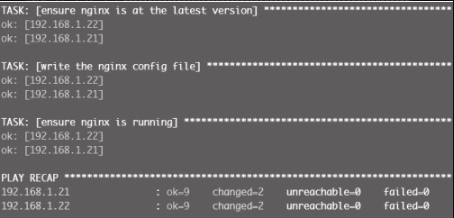
角色 web 定义了 handlers、tasks、templates 三个功能类,基本上是9.6 节中的 nginx 管理 playbook 对应定义功能段打散后的内容。具体功能块配置文件定义如下:
- name: restart nginx
service: name=nginx state=restarted- name: ensure nginx is at the latest version
yum: pkg=nginx state=latest
- name: write the nginx config file
template: src=nginx2.conf dest=/etc/nginx/nginx.conf
notify:
- restart nginx
- name: ensure nginx is running
service: name=nginx state=starteduser nginx;
worker_processes {{ worker_processes }};
{% if num_cpus == 2 %}
worker_cpu_affinity 01 10;
{% elif num_cpus == 4 %}
worker_cpu_affinity 1000010000100001;
{% elif num_cpus >= 8 %}
worker_cpu_affinity 00000001 00000010 00000100 00001000 00010000 00100000
0100000010000000;
{% else %}
worker_cpu_affinity 1000010000100001;
{% endif %}
worker_rlimit_nofile {{ max_open_file }};
……具体 web 角色定义细节将不展开描述,可参考 9.6 节及 common 角色的说明。