Ansible 常用模块及 API

Ansible 提供了非常丰富的功能模块,包括 Cloud(云计算)、Commands(命令行)、Database(数据库)、Files(文件管理)、Internal(内置功能)、Inventory(资产管理)、Messaging(消息队列)、Monitoring(监控管理)、Net Infrastructure(网络基础服务)、Network(网络管理)、Notification(通知管理)、Packaging(包管理)、Source Control(版本控制)、System(系统服务)、Utilities(公共服务)、Web Infrastructure(Web基础服务),等等,更多模块介绍见官网模块介绍(网址: http://ansibleworks.com/docs/modules.html )。模块默认存储目录为 /usr/share/ansible/,存储结构以模块分类名作为目录名,模块文件按分类存放在不同类别目录中。命令行调用模块格式:ansible <pattern_goes_here(操作目标)> -m<module_name(模块名)> -a <module_args(模块参数)>,其中默认的模块名为 command,即 “-m command” 可省略。获取远程 webservers 组主机的 uptime 信息格式如图9-3所示。
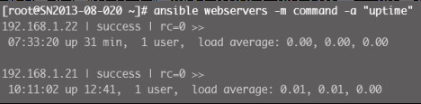
image 2023 12 08 19 46 34 126
Figure 1. 图9-3 获取主机 uptime 信息

以上命令等价于 ansible webservers -a "uptime",获得模块的帮助说明信息格式:ansible-doc <模块名>,得到 ping 模块的帮助说明信息如图9-4所示。
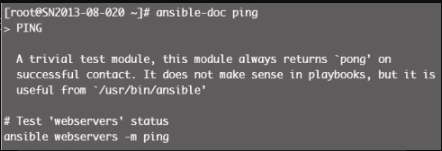
image 2023 12 08 19 47 24 322
Figure 2. 图9-4 ping模块帮助信息

在 playbooks 中运行远程命令格式如下:

- name: reboot the servers
  action: command /sbin/reboot -t now

Ansible 0.8 或以上版本支持以下格式:

- name: reboot the servers
  command: /sbin/reboot -t now

Ansible 提供了非常丰富的模块,涉及日常运维工作的方方面面。下面介绍 Ansible 的常用模块,更多模块介绍见官方说明。

远程命令模块

功能

模块包括 command、script、shell,都可以实现远程 shell 命令运行。command 作为 Ansible 的默认模块,可以运行远程权限范围所有的 shell 命令;script 功能是在远程主机执行主控端存储的 shell 脚本文件,相当于 scp+shell 组合;shell 功能是执行远程主机的 shell 脚本文件。

例子

ansible webservers -m command -a "free -m"
ansible webservers -m script -a "/home/test.sh 12 34"
ansible webservers -m shell -a "/home/test.sh"

copy模块

功能

实现主控端向目标主机拷贝文件,类似于 scp 的功能。

例子

以下示例实现拷贝 /home/test.sh 文件至 webserver 组目标主机 /tmp/ 目录下,并更新文件属主及权限(可以单独使用 file 模块实现权限的修改,格式为: path=/etc/foo.conf owner=foo group=foo mode=0644)。

# ansible  webservers  -m  copy  -a  "src=/home/test.sh  dest=/tmp/  owner=root group=root mode=0755"

stat模块

功能

获取远程文件状态信息,包括 atime、ctime、mtime、md5、uid、gid 等信息。

例子

ansible webservers -m stat -a "path=/etc/sysctl.conf"

get_url模块

功能

实现在远程主机下载指定 URL 到本地,支持 sha256sum 文件校验。

例子

ansible webservers -m get_url -a "url=http://www.baidu.com dest=/tmp/index.html mode=0440 force=yes"

yum模块

功能

Linux 平台软件包管理操作,常见有 yum、apt 管理方式。

例子

ansible webservers -m apt -a "pkg=curl state=latest"
ansible webservers -m yum -a "name=curl state=latest"

cron模块

功能

远程主机 crontab 配置。

例子

ansible webservers -m cron -a "name='check dirs' hour='5,2' job='ls -alh > /dev/null'"

效果如下:

#Ansible: check dirs
* 5,2 * * * ls -alh > /dev/nullsalt '*' file.chown /etc/passwd root root

mount模块

功能

远程主机分区挂载。

例子

ansible webservers -m mount -a "name=/mnt/data src=/dev/sd0 fstype=ext3 opts=ro state=present"

service模块

功能

远程主机系统服务管理。

例子

ansible webservers -m service -a "name=nginx state=stopped"
ansible webservers -m service -a "name=nginx state=restarted"
ansible webservers -m service -a "name=nginx state=reloaded"

sysctl包管理模块

功能

远程 Linux 主机 sysctl 配置。

例子

sysctl: name=kernel.panic value=3 sysctl_file=/etc/sysctl.conf checks=before reload=yessalt '*' pkg.upgrade

user服务模块

功能

远程主机系统用户管理。

例子

#添加用户johnd;
ansible webservers -m user -a "name=johnd comment='John Doe'"
#删除用户johnd;
ansible webservers -m user -a "name=johnd state=absent remove=yes"

playbooks 模块调用格式如下,以 command 模块为例(0.8 或更新版本格式):

  • name: reboot the servers

  • command: /sbin/reboot -t now